FutureProvider: how to use it and how to test it.

We can't talk about Flutter state management solutions without talking about package:riverpod.
Of course, just as I have mentioned in other articles, in my opinion, package:riverpod is more of a dependency injection tool than a state management solution. It does include APIs like StateNotifier which can be used as a state management solution but that is a topic for another article.
Today I want to focus on one of the tools that are included inside the package:riverpod. The FutureProvider.
The problem
Almost every app has one feature that makes a single asynchronous operation to get some data that later on will be displayed to the user using some widgets.
As a good developer, you create a new feature folder with the view/ and your selected state management solution call it bloc/, cubit/, state_notifier/, provider/ or whatever you want.
But while writing every single line of code you are thinking:
It's kind of non-sense to write this amount of code for an extremely simple feature.

Enters FutureProvider
Straight from the docs:
A
FutureProvidercan be considered as a combination of Provider and FutureBuilder. By usingFutureProvider, the UI will be able to read the state of the future synchronously, handle the loading/error states, and rebuild when the future completes.
We get access to data, loading, and error states based on a Future operation that is usually an http request.
It's important to understand that we get access to these states thanks to AsyncValue that is another API included in the package:riverpod.
The code
Nothing is better than the code itself to understand how a FutureProvider works.
You are going to build the following app:
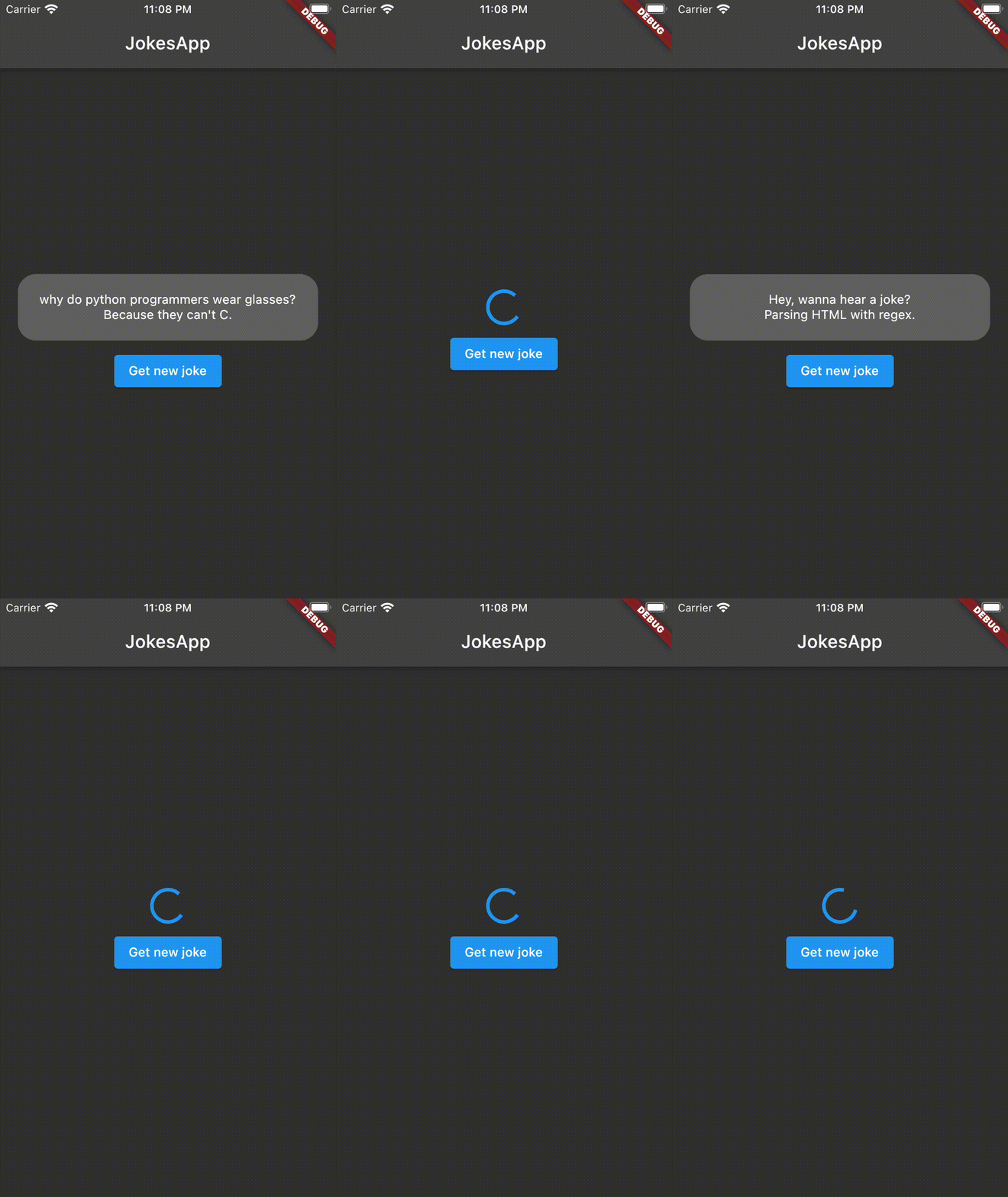 It's a simple app that fetches a new programming joke after pressing a button. It uses the following jokes API sv443.
Folder/File structure
To start, we are going to create the following folder/file structure.
.
└── lib/
    ├── app/
    │   └── app.dart
    └── jokes/
        ├── logic/
        │   └── jokes_provider.dart
        ├── model/
        │   ├── joke.dart
        │   └── models.dart (barrel file)
        ├── view/
        │   └── jokes_page.dart
        └── jokes.dart (barrel file)
The app can be generated with the default flutter create command. It is going to have a single feature jokes/, separated into 3 parts. First, the logic of the feature in the /logic folder, which is going to contain the FutureProvider inside jokes_provider.dart. Then the user interfaces in the /view folder, which is going to contain the JokesPage inside jokes_page.dart. Finally, we need a model to serialize the response from the API so we are going to create a Joke model in themodel/ folder inside joke.dart.
Joke Model
import 'package:equatable/equatable.dart';

class Joke extends Equatable {
  const Joke({
    required this.error,
    required this.category,
    required this.type,
    required this.setup,
    required this.delivery,
    required this.id,
    required this.safe,
    required this.lang,
  });

  factory Joke.fromJson(Map<String, dynamic> json) => Joke(
        error: json['error'] as bool? ?? false,
        category: json['category'] as String? ?? '',
        type: json['type'] as String? ?? '',
        setup: json['setup'] as String? ?? '',
        delivery: json['delivery'] as String? ?? '',
        id: (json['id'] as num?)?.toInt() ?? 0,
        safe: json['safe'] as bool? ?? false,
        lang: json['lang'] as String? ?? '',
      );

  final bool error;
  final String category;
  final String type;
  final String setup;
  final String delivery;
  final int id;
  final bool safe;
  final String lang;

  @override
  List<Object?> get props => [
        error,
        category,
        type,
        setup,
        delivery,
        id,
        safe,
        lang,
      ];
}
This class will be in charge of serializing the JSON response from the API. You can check a sample response here.
Jokes Logic
Now, the reason we are here the FutureProvider that will make the HTTP request and handle the states changes of the joke query.
For this example, I'm using Dio as the http client.
Dio Client Provider
final dioClientProvider = Provider<Dio>(
  (ref) => Dio(
    BaseOptions(baseUrl: 'https://v2.jokeapi.dev/joke'),
  ),
);
It's important to create an independent Provider for the http client so that later we can mock it for testing purposes of the FutureProvider.
Jokes Future Provider
final jokesFutureProvider = FutureProvider<Joke>((ref) async {
  final result = await ref.read(dioClientProvider).get<Map<String, dynamic>>(
        '/Programming?type=twopart',
      );

  return Joke.fromJson(result.data!);
});
Yes... that's it.
With these lines of code, we're able to handle the loading, data, and error states of the request.
When called, the jokesFutureProvider will make the http request. On success, it will update its state to AsyncValue.data(Joke). If any errors occur during the request or serialization, the error will be automatically caught and the state will be updated to AsyncValue.error(ErrorObject). And while loading the jokesFutureProvider state will be AsyncValue.loading.
Jokes Page
Now we just need to create a User Interface to see the jokesFutureProvider in action.
JokeWidget
First, we can subscribe to state changes of the jokesFutureProvider doing:
final jokeState = ref.watch(jokesFutureProvider);
🚀 calling
refwatchon thejokesFutureProviderwill trigger the asynchronous operation of theFutureProvider.
The jokeState variable will give you access to the AsyncValue object and with its built-in when method we can easily handle the different states of the FutureProvider.
class JokeWidget extends ConsumerWidget {
  const JokeWidget({Key? key}) : super(key: key);

  @override
  Widget build(BuildContext context, WidgetRef ref) {
    final jokeState = ref.watch(jokesFutureProvider);

    return jokeState.when(
      loading: () => const Center(child: CircularProgressIndicator()),
      error: (error, _) => const Text(
        'Ups an error occurred. Try again later.',
        key: const Key('jokesPage_jokeWidget_errorText'),
      ),
      data: (joke) => Container(
        key: const Key('jokesPage_jokeWidget_jokeContainer'),
        padding: const EdgeInsets.all(20),
        decoration: BoxDecoration(
          borderRadius: BorderRadius.circular(20),
          color: Theme.of(context).secondaryHeaderColor,
        ),
        child: Column(
          children: [
            Text(joke.setup),
            Text(joke.delivery),
          ],
        ),
      ),
    );
  }
}
Get Joke Button
We have a widget that shows the joke, but we need a button to be able to refresh this joke and get a new one.
Calling ref.refresh(jokesFutureProvider) will refresh the provider and repeat the asynchronous operation.
Consumer(
  builder: (context, ref, _) {
    return Align(
      child: ElevatedButton(
        onPressed: () {
          ref.refresh(jokesFutureProvider);
        },
        child: const Text('Get new joke'),
      ),
    );
  },
),
Finally, we can put all of it together in the JokesPage:
import 'package:flutter/material.dart';
import 'package:flutter_riverpod/flutter_riverpod.dart';
import 'package:future_provider_jokes_app/jokes/jokes.dart';

class JokesPage extends StatelessWidget {
  const JokesPage({Key? key}) : super(key: key);

  @override
  Widget build(BuildContext context) {
    return const JokesView();
  }
}

class JokesView extends StatelessWidget {
  const JokesView({Key? key}) : super(key: key);

  @override
  Widget build(BuildContext context) {
    return Scaffold(
      appBar: AppBar(title: const Text('JokesApp')),
      body: Padding(
        padding: const EdgeInsets.symmetric(horizontal: 20),
        child: Column(
          crossAxisAlignment: CrossAxisAlignment.stretch,
          mainAxisAlignment: MainAxisAlignment.center,
          children: [
            const JokeWidget(),
            const SizedBox(height: 10),
            Consumer(
              builder: (context, ref, _) {
                return Align(
                  child: ElevatedButton(
                    onPressed: () {
                      ref.refresh(jokesFutureProvider);
                    },
                    child: const Text('Get new joke'),
                  ),
                );
              },
            ),
          ],
        ),
      ),
    );
  }
}
With this, we have a fully implemented feature that gets us funny programming jokes 🎉.
Just in case you need it, here you have the other files needed to run the app.
Other files
app.dart
import 'package:flutter/material.dart';
import 'package:future_provider_jokes_app/jokes/jokes.dart';

class JokesApp extends StatelessWidget {
  const JokesApp({Key? key}) : super(key: key);

  @override
  Widget build(BuildContext context) {
    return MaterialApp(
      theme: ThemeData.dark(),
      home: const JokesPage(),
    );
  }
}
With this we have
main.dart
import 'package:flutter/material.dart';
import 'package:flutter_riverpod/flutter_riverpod.dart';
import 'package:future_provider_jokes_app/app/app.dart';

void main() {
  runApp(const ProviderScope(child: JokesApp()));
}
Testing 🧪
We cannot call ourselves good developers if we do not test our code. In this channel we test everything.
Tests folder structure:
test/
└── jokes/
    ├── logic/
    │   └── jokes_provider_test.dart
    └── view/
        └── jokes_page_test.dart
Let's start with the logic of our app.
For the tests I'll assume you have some extra knowledge of how
package:riverpodworks. If you would like a more in detailed article onOverrideandProviderContainerplease let me know in the comments.
DioProvider Test
We can add a test to validate that the Dio client has the correct url.
void main() {
  group('dioClientProvider', () {
    test('is a Dio with https://v2.jokeapi.dev/joke base url', () {
      final container = ProviderContainer();

      final dio = container.read(dioClientProvider);

      expect(dio, isA<Dio>());
      expect(dio.options.baseUrl, 'https://v2.jokeapi.dev/joke');
    });
  });
}
ℹ️ From de docs:
ProviderContainerAn object that stores the state of the providers and allows overriding the behavior of a specific provider. If you are using Flutter, you do not need to care about this object (outside of testing), as it is implicitly created for you byProviderScope.
FutureProvider Test
Hopefully you remember how earlier in the article I mention the importance of creating a n independent dioProvider so that we were able to mock it for testing purposes. Well we've reached that point.
We'll use mocktail to create mocks of the Dio http client and the Response object.
class MockDio extends Mock implements Dio {}

class MockDioResponse<T> extends Mock implements Response<T> {}
Before start writing the tests let's create a group for the jokesFutureProvider so we can keep our test file organized.
 group('jokesFutureProvider', () {
    late Dio client;

    setUp(() {
      client = MockDio();
    });
  });
To start, we can test the happy path of the jokesFutureProvider. We can test that the FutureProvider state first changes to AsyncValue.loading and if the http request success the state will change to AsyncValue.data. We can also validate that the http request is made to the correct url.
test('returns AsyncValue.data when joke request success', () async {
  const jsonMap = <String, dynamic>{
    'error': false,
    'category': 'Programming',
    'type': 'twopart',
    'setup': 'Why are modern programming languages so materialistic?',
    'delivery': 'Because they are object-oriented.',
    'id': 21,
    'safe': true,
    'lang': 'en',
  };

  final response = MockDioResponse<Map<String, dynamic>>();
  when(() => response.data).thenReturn(jsonMap);

  // Use the mock response to answer any GET request made with the
  // mocked Dio client.
  when(() => client.get<Map<String, dynamic>>(any()))
      .thenAnswer((_) async => response);

  final container = ProviderContainer(
    overrides: [
      dioClientProvider.overrideWithValue(client),
    ],
  );

  // Expect the first state to be AsyncValue.loading.
  expect(container.read(jokesFutureProvider), AsyncValue<Joke>.loading());

  // Read the value of `jokesFutureProvider` which will trigger the
  // Asynchronous operation.
  await container.read(jokesFutureProvider.future);

  // Expect AsyncValue.data after the future completes.
  expect(
    container.read(jokesFutureProvider),
    AsyncValue<Joke>.data(
      Joke.fromJson(jsonMap),
    ),
  );

  // Verify the GET request was made to the correct URL.
  verify(
    () => client.get<Map<String, dynamic>>('/Programming?type=twopart'),
  ).called(1);
});
Now we can test the the opposite scenario. What happens when an error occurs during the asynchronous operation of the FutureProvider?. We would expect to have an AsyncValue.error. Let's test that:
test('returns AsyncValue.error when joke request throws', () async {
  final exception = Exception();

  // Use the mocked Dio client to throw when any get request is made
  when(() => client.get<Map<String, dynamic>>(any())).thenThrow(exception);

  final container = ProviderContainer(
    overrides: [
      dioClientProvider.overrideWithValue(client),
    ],
  );

  // Expect the first state to be AsyncValue.loading.
  expect(container.read(jokesFutureProvider), AsyncValue<Joke>.loading());

  // Read the value of `jokesFutureProvider` which will trigger the
  // Asynchronous operation.
  await expectLater(
    container.read(jokesFutureProvider.future),
    throwsA(isA<Exception>()),
  );

  // Expect AsyncValue.error after the future completes.
  expect(
    container.read(jokesFutureProvider),
    isA<AsyncError<Joke>>().having((e) => e.error, 'error', exception),
  );

  // Verify the GET request was made to the correct URL.
  verify(
    () => client.get<Map<String, dynamic>>('/Programming?type=twopart'),
  ).called(1);
});
UI Tests
After testing the logic/state_management part of our application we can proceed to test the UI. So that we can ensure that the app renders the correct widgets for the correct states.
Helper
Inside the test/ directory let's add a helper that will make the UI testing process easy.
test/
└── helpers/
    ├── helpers.dart (barrel file)
    └── pump_app.dart
And inside the pump_app.dart file let's add the following extension method.
import 'package:flutter/material.dart';
import 'package:flutter_riverpod/flutter_riverpod.dart';
import 'package:flutter_test/flutter_test.dart';

extension PumpApp on WidgetTester {
  Future<void> pumpApp(
    Widget widget, {
    List<Override> overrides = const [],
  }) {
    return pumpWidget(
      ProviderScope(
        overrides: overrides,
        child: MaterialApp(
          home: widget,
        ),
      ),
    );
  }
}
With this extension method we can add the ProviderScope and pass in some overrides for every test.
Now we can go to the jokes_page_test.dart file and write our tests.
JokesPage Test
Let's start creating the group for the JokesPage tests:
void main() {
  group('JokesPage', () {
      // We'll use this later
      const tJoke = Joke(
          error: false,
          category: 'category',
          type: 'type',
          setup: 'setup',
          delivery: 'delivery',
          id: 1,
          safe: true,
          lang: 'lang',
    );

    // tests go here ...
  });
}
To mock the state of the FutureProvider during any test, we just need override the value of the jokesFutureProvider like this:
await tester.pumpApp(
  // any Widget ...
  overrides: [
    jokesFutureProvider.overrideWithValue(AsyncValue.loading()),
  ],
);
Knowing this, we can create the first test that simply validates if the JokesPage renders all the expected widgets.
testWidgets('renders JokeWidget and ElevatedButton', (tester) async {
  await tester.pumpApp(
    JokesPage(),
    overrides: [
      jokesFutureProvider.overrideWithValue(AsyncValue.loading()),
    ],
  );

  expect(find.byType(JokesPage), findsOneWidget);
  expect(find.byType(JokeWidget), findsOneWidget);
  expect(find.byType(ElevatedButton), findsOneWidget);
});
Now that you get how to the overrides let's test the loading, data and error cases for the JokeWidget:
group('JokeWidget', () {
  final errorTextFinder = find.byKey(Key('jokesPage_jokeWidget_errorText'));
  final jokeContainerFinder =
      find.byKey(Key('jokesPage_jokeWidget_jokeContainer'));

  testWidgets('renders CircularProgressIndicator for AsyncValue.loading',
      (tester) async {
    await tester.pumpApp(
      JokesPage(),
      overrides: [
        jokesFutureProvider.overrideWithValue(AsyncValue.loading()),
      ],
    );

    expect(find.byType(CircularProgressIndicator), findsOneWidget);
    expect(jokeContainerFinder, findsNothing);
    expect(errorTextFinder, findsNothing);
  });

  testWidgets('renders error text for AsyncValue.error', (tester) async {
    await tester.pumpApp(
      JokesPage(),
      overrides: [
        jokesFutureProvider.overrideWithValue(AsyncValue.error('')),
      ],
    );

    expect(errorTextFinder, findsOneWidget);
    expect(jokeContainerFinder, findsNothing);
    expect(find.byType(CircularProgressIndicator), findsNothing);
  });

  testWidgets('renders jokes container for AsyncValue.data',
      (tester) async {
    await tester.pumpApp(
      JokesPage(),
      overrides: [
        jokesFutureProvider.overrideWithValue(AsyncValue.data(tJoke)),
      ],
    );

    expect(errorTextFinder, findsNothing);
    expect(find.byType(CircularProgressIndicator), findsNothing);
    expect(jokeContainerFinder, findsOneWidget);
  });
});
FutureProvider.refresh
We are about to test the last part of our UI but this one can be tricky for some new developers. We need to test that the jokesFutureProvider is refreshed (it calls the asynchronous operation again) when the button in the JokesPage is pressed.
To do this you could think of trying to mock the FutureProvider, but this can be tricky and confusing. But we can mock the asynchronous operation that the FutureProvider executes and verify that it is called after pressing the button.
To do this we first need a function that can be mocked, to do this we could use a callable class:
class MockFunction extends Mock {
  Future<Joke> call();
}
and the test will end up looking like this:
testWidgets('refresh jokesFutureProvider when ElevatedButton is tapped',
    (tester) async {
  final mockFunction = MockFunction();

  when(mockFunction.call).thenAnswer((_) => Future.value(tJoke));

  await tester.pumpApp(
    JokesPage(),
    overrides: [
      jokesFutureProvider.overrideWithProvider(
        FutureProvider((_) => mockFunction.call()),
      ),
    ],
  );

  expect(find.byType(ElevatedButton), findsOneWidget);

  await tester.tap(find.byType(ElevatedButton));

  verify(
    mockFunction.call,
  ).called(2);
});
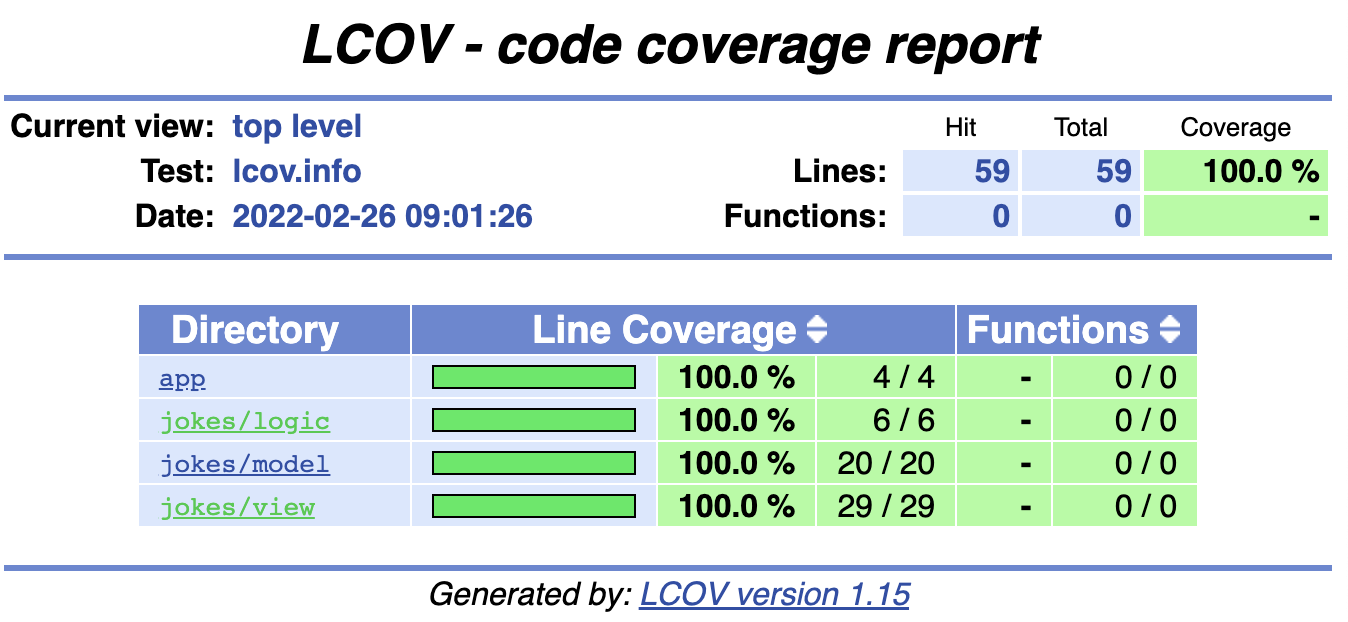
and just like that we are able to achieve 100% test coverage in our jokes application 🧪🎉.
Final thoughts
Before ending is my responsibility to remind you two things:
- Remember to test your code as you are making a favor to your future self.
- Use
FutureProviderin a responsible way, it is a great tool for some simple logic flows but always think through so that you can decide the best solution.
Thanks for reading all the way! I hope this article was helpful.
If you would like to have any similar article covering another tool or state management solution, let me know in the comments.
If you got any questions feel free to contact me through any of my socials.
About the author
I'm a Senior Engineer at Somnio Software, a software development agency. I focus on writing high-quality, scalable, and testable applications. I like to write articles and make videos about tech.
Comments
Join the discussionNo comments yet. Be the first to comment.